PsychoPy Builder Tutorial
Getting started
This section demonstrates the purpose of the psychopy-bids plugin in Builder.
The goal is to log participant-relevant experiment events into BIDS-compatible event tables.
In a minimal PsychoPy example, a fixed text is presented to the participant. The flow includes a text routine and one BIDS export routine.

You can link another component to automatically capture onset, duration, response time, and event type attributes. If custom values are needed, you can enable Manually set values and override selected fields.
Please note: if Response Time is enabled for a component that does not expose .rt, a runtime warning is shown.

The onset is the moment the component appears on screen. Duration is computed from component stop minus component start (or routine stop fallback where relevant).
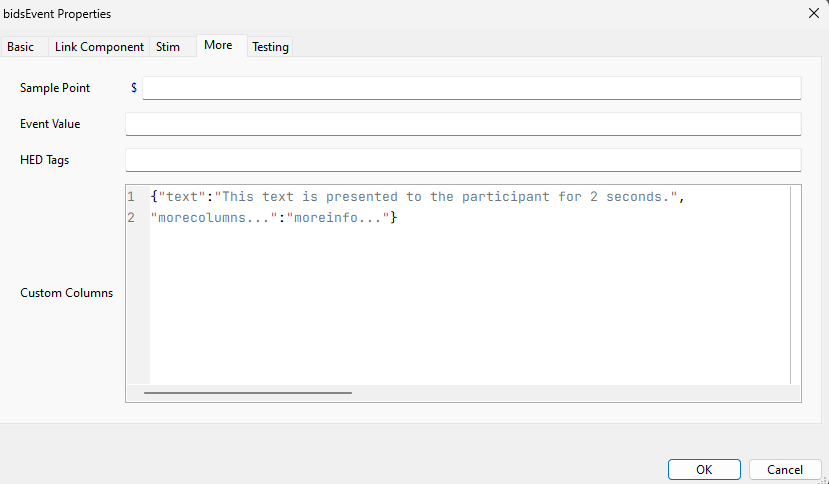
To include richer metadata, add custom columns under the More tab using dictionary syntax.

The final events table contains one row per event.
Linked Components
Using linked components allows dynamic capture of key runtime properties.
- Enter a valid component name in Link Component.
- Select the linked attributes you want in the exported table.
How linked values are derived
Note: this is primarily for understanding and manual override scenarios. If `.tStopRefresh` exists: If `.tStopRefresh` does not exist:Configuring BIDS Export
Add one BIDS Export routine near the end of the experiment flow.
In this routine, define:
- dataset name
- data type (
beh,func,eeg,ieeg,meg,nirs,motion,mrs,pet) - optional session and acquisition labels
- run behavior (
True,False, or fixed string label) - optional sidecar, HED generation, stimuli, code, and environment export
Run behavior
runs=True: auto-incremented labels (run-001,run-002, ...)runs=False: no run entityruns="4a": fixed run label
Session behavior
If the routine session field is empty, the export falls back to expInfo['session'].
Optional Onset Synchronization
Use BidsOnsetRoutine when timing must be synchronized to an external trigger.
Recommended placement: before the first routine that emits BIDS events.
Expected output
After a successful run, expect:
- dataset-level metadata at root (
dataset_description.json,participants.tsv,README,CHANGES,LICENSE) - event files under
sub-<label>/[ses-<label>/]<data_type>/ - optional sidecar file(s)
- optional
stimuli/andcode/folders
Validate output quickly
- Open generated
.tsvfiles and verify column consistency. - Confirm onset and duration values match experiment timing.
- Check sidecar descriptions for custom columns.
- Run a BIDS validator before sharing data.
Common pitfalls
Response Timerequires a linked component with.rt.- Invalid custom-column dictionary syntax fails at runtime.
- Inconsistent custom columns across routines create sparse tables.
- Unexpected run names are usually due to the
runssetting.